Portal: batch jobs
A batch job (a headless session) runs one command in a container on CANFAR, with no window, and ends: reducing a night of data, running a pipeline, many copies of a script in parallel. You start it, leave, and read what it printed when it is done. Batch jobs need you to be signed in, and use your CANFAR allocation.
Launching a batch job
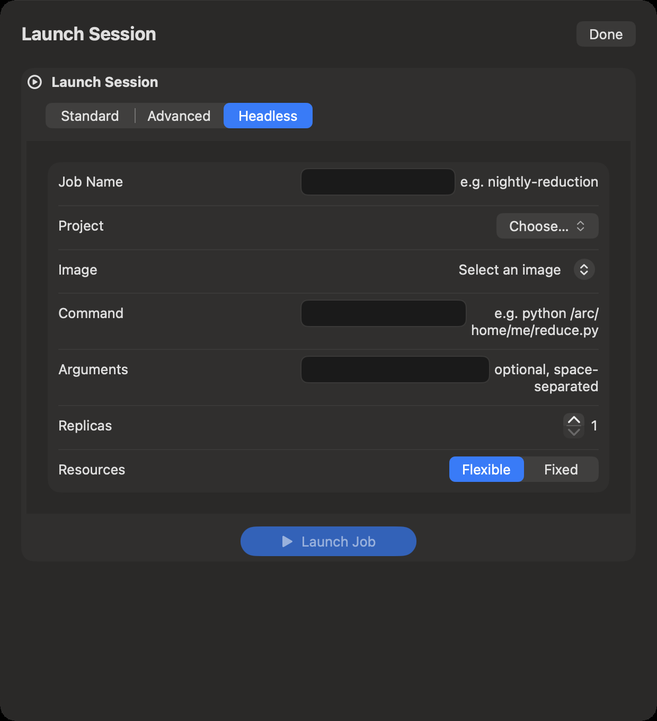
- In Portal, click Launch Session, then the Headless tab.
- Job Name: a name to find it by, such as
nightly-reduction. - Project and Image: an image built to run batch jobs. If none is listed, your account has no batch images; ask CADC support.
- Command: what the container runs, such as
python /arc/home/me/reduce.py. It is required. - Arguments: optional, separated by spaces, passed as one string that CANFAR splits.
- Replicas: how many copies run in parallel. Each copy gets
REPLICA_IDandREPLICA_COUNTin its environment, to share the work. - Resources: Flexible or Fixed, as for a session.
- Click Launch Job (or Launch … Replicas).
Your VOSpace home is at /arc/home/<your username> inside the container: read your data and write
your results there.
Following your jobs
The Batch Jobs card in Portal counts your jobs: running, pending, completed and failed. It refreshes every 45 seconds, and its button refreshes it now. Jobs & History… opens the list.
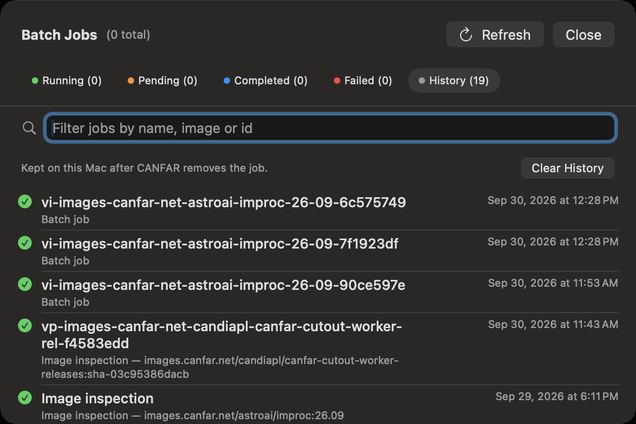
- The tabs: Running, Pending, Completed, Failed and History, each with its count.
- Filter jobs by name, image or id narrows every tab.
- With thousands of jobs, the list shows them a page at a time (Showing … of …); Show … More adds the next.
- Each job shows its name, image and time. Its info button shows the Job details: name, type, identity, image, status, container, the Resources Requested, and its Timing.
- View Events & Logs: what the platform did with the job, and what it printed.
- Delete removes a finished job from the list; for a running job, Stop and Delete kills its container at once, after asking, and unsaved work in it is lost.
- Refresh (⌘R) reads the jobs again from CANFAR now.
Verbinal sends a notification when a job you started completes or fails, and when a batch of them has ended.
The probe jobs of Image Discovery appear here too, as image inspections.
History
CANFAR removes finished jobs after a while. Verbinal keeps them in History, on this Mac, with how each ended, so you can still find a job after CANFAR has forgotten it. Clear History empties it.
What an assistant can do here
It can list your jobs and their history, read a job's details, events and logs, launch jobs (with a Python script, or a command), and stop or delete them, which waits for you unless you allowed it. Starting jobs uses your allocation, and is a kind of change you can set to Ask me.