Remote Compute
Remote Compute runs Python or Bash on CANFAR, in one session on your own account named
verbinal-compute, and keeps every run with its output. You run code there from this screen, and your
AI assistant runs its code there with its run_code tool. The session uses your cores, has no shell and
no inbound network, and writes its results to your storage. It needs you to be signed in; open it from
its Home tile.
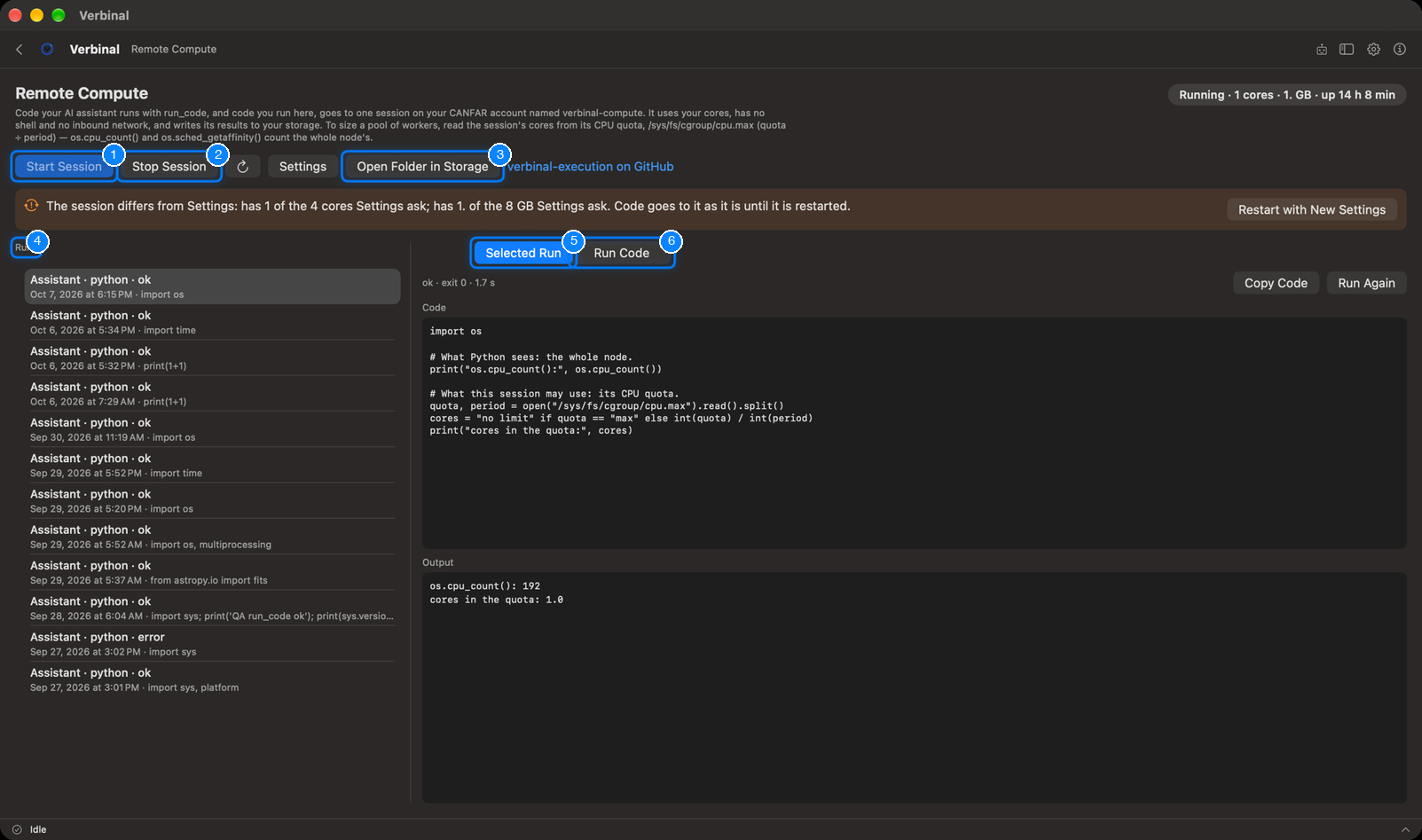
- Start Session starts the compute session.
- Stop Session stops it.
- Open Folder in Storage: the folder the session reads requests from and writes results to.
- Runs: every run, newest first.
- Selected Run: the code of the run you chose, and what came back.
- Run Code: run your own code.
Setting it up
Remote Compute needs a compute image, chosen once:
- Get the watcher image: build verbinal-execution from
its repository, and push it to your project on
images.canfar.net. - In Settings ▸ AI Compute, set the Compute image, the Cores and RAM (GB) it runs with, and a registry login if the image is private (see Settings).
- Come back to Remote Compute and click Start Session. The session takes a minute or two to come up.
Until an image is set, the screen says Not set up and shows these steps, with Open Settings and Open the Repository.
The session
The status at the top right says where the session is: Stopped, Starting, Running (with its cores, memory and how long it has been up), Stopping, Failed, or Not ready: the session exists but its image cannot be pulled, with the reason and a way to stop it.
- Stop Session asks first: stopping deletes the session and anything running in it. Code sent but not yet run stays in the inbox and runs when the session starts again.
- Refresh reads the session's state again; Settings opens Settings ▸ AI Compute.
- When the running session is not the size Settings ▸ AI Compute asks for, a banner says so; code still goes to the session as it is. Restart with New Settings stops it and starts one with the settings.
To size a pool of workers in your code, read the session's cores from its CPU quota,
/sys/fs/cgroup/cpu.max (quota ÷ period): os.cpu_count() counts the whole node's.
Running code
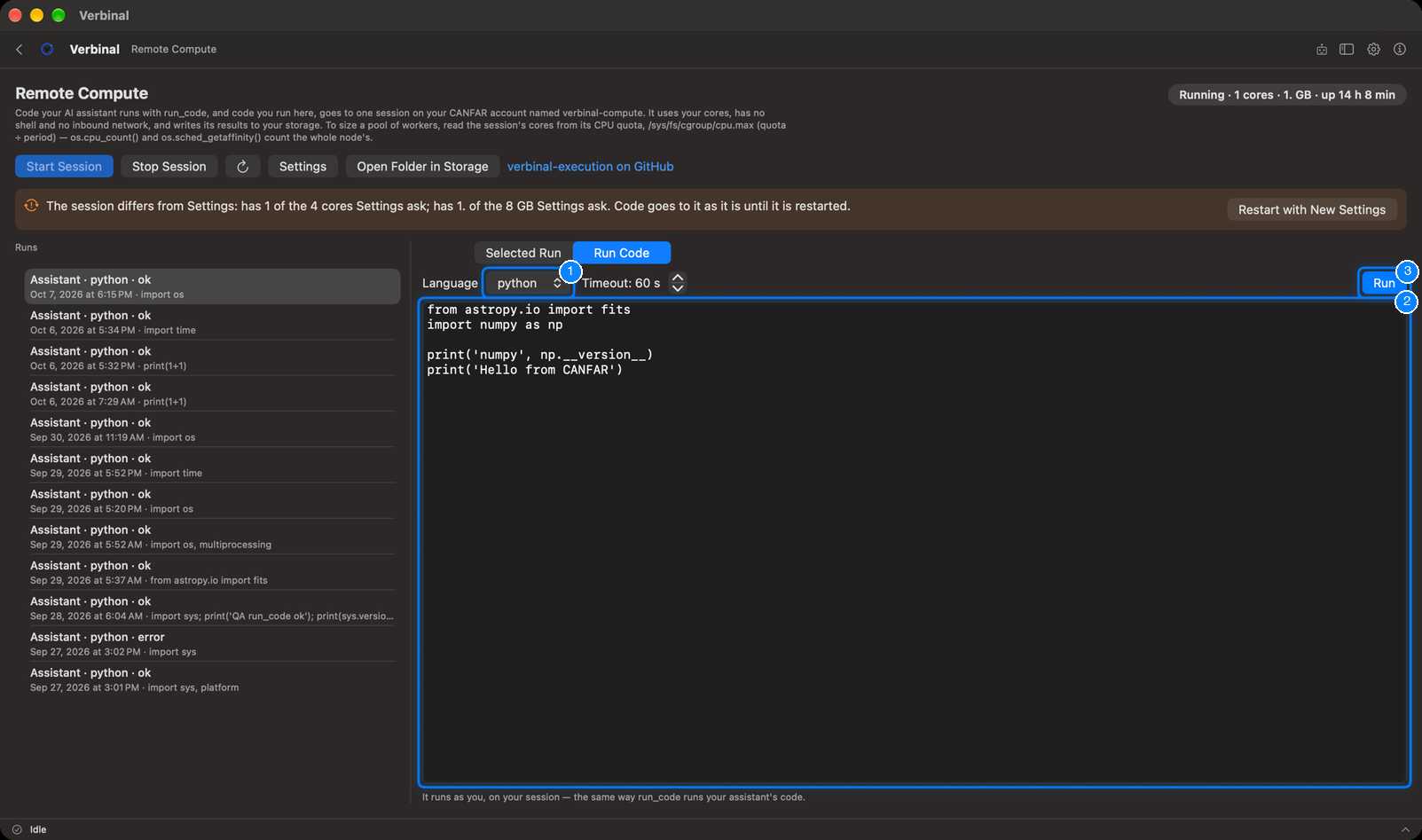
- Language: python or bash. Beside it, the timeout, in seconds.
- Type the code in the box.
- Click Run (⌘↩).
It runs as you, on your session, the same way run_code runs your assistant's code. The run then
appears at the top of Runs.
Runs
Each run in the list says who sent it (You or Assistant), its language, and how it ended: running, ok, error, timed out, no result, or not sent. Select one to see, under Selected Run:
- its status, exit code and how long it took;
- its Code, its Output and its Errors (output cut short when it was too long);
- Copy Code, and Run Again to send the same code once more.
A run does not depend on Verbinal staying open: it carries on while you sign out or quit, and its result is taken when Verbinal can read it again.
What an assistant can do here
It can read the session's state and the runs, start the session, run code and read its output, show you a run, and put code in the Run Code box for you to run. Running code uses your allocation, as Use your CANFAR allocation: sessions and compute; stopping the session is Stop running work on CANFAR, which waits for you by default. The compute image and its size stay yours to set.